
Projection Stepper
The Projection Stepper is the operator-facing replay tool for projections running inside a monitored service. Pick a registered projection, point it at a source slice of events, and step row-by-row through the resulting per-event before / after state — with the same projection code the monitored service runs in production. It is the answer to "what is this projection doing on this stream?" and "why is the state shaped like that at version N?".
Route: /explorer?tab=step — the Step Through tab of the Event Store Explorer, always shown, in its Projection mode. Every shortcut opens it filled in: a stream's Step through projection on the Streams tab, the Event Explorer tab's "Step through with projection…" action (which runs it straight away), Step through on a projection's row, page and dead letters, its stale and dead-letter alerts, and its cards on the Event Model. See Step Through.
The Event Store Explorer's own tabs — Operations / Streams / Event Explorer / Configuration — describe what's on the store; the stepper runs a projection over a slice of it and shows you each step.
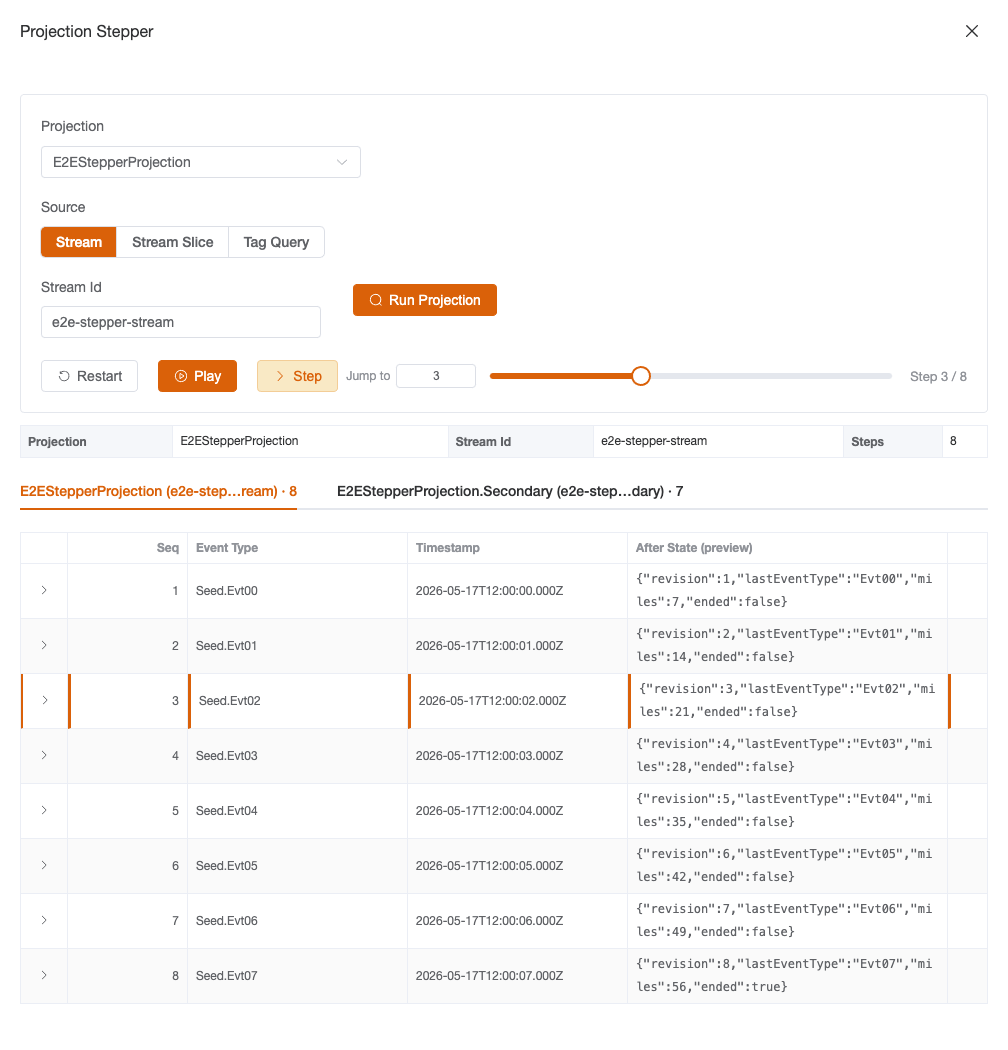
What you see
The stepper has five regions, top to bottom:
| Region | What it does |
|---|---|
| Projection picker | An <el-select> of projections registered on the selected service. Sourced from the same RequestProjectionStatuses cache the Explorer's Operations tab populates (unioned with the projections the service declares in its capability snapshot, and allow-create so an unlisted name can be typed) — opening the stepper for a never-viewed service lazy-fetches the list. |
| Source-mode picker | An <el-radio-group> that swaps the source input row between Stream, Stream Slice, and Tag Query modes (see Walking through a replay). |
| Source input row | Conditional on the source mode: a stream-id field for Stream and StreamSlice, plus from / to version <el-input-number> pair for StreamSlice, or a key / value tag-row editor for TagQuery. |
| Run button + toolbar | Run Projection dispatches the wire request. Once a response lands, the toolbar exposes Restart · Play / Pause · Step · Jump to N · Scrubber · cursor (Step N / Total). |
| Timeline + diff | Below the toolbar: a tab strip with one tab per aggregate instance the source slice touches, the per-tab timeline list (Event Type · Timestamp · After State preview · View Apply Source · expand-for-diff), and the Monaco JSON diff between the active row's before and after. |
Walking through a replay
Pick a projection
The picker enumerates whatever the monitored service's IEventStore knows about — Marten, Polecat, Fisher, anything else. The control is <el-select filterable> so typing narrows the list, and registering a projection only via source-generated [GeneratedEvolver] dispatchers is sufficient (the picker doesn't require an EventModelDefinition).
Pick a source mode
The same projection can be replayed over three different shapes of source slice. The picker is mode-distinct: switching modes wipes the in-flight inputs so a previous mode's stale values can't accidentally ride along.
| Mode | What flows into the projection | Wire shape |
|---|---|---|
| Stream (default) | Every event in streamId, in stream-version order. | RequestProjectionRun { SourceMode = Stream, StreamId } |
| Stream Slice | Events in streamId bounded by inclusive [FromVersion, ToVersion]. | RequestProjectionRun { SourceMode = StreamSlice, StreamId, FromVersion, ToVersion } |
| Tag Query | The (possibly cross-stream) event list matched by a DCB tag map. | RequestProjectionRun { SourceMode = TagQuery, Tags = { ... } } |
Stream is the common case — most operators reach for the stepper to chase down "what does this projection look like at version N of this stream?" Stream Slice is the precision tool for cordoning off a single chunk of the stream (e.g. step through events 42..50 to inspect a known incident window). Tag Query is the DCB-projection escape hatch: when the projection isn't stream-anchored, the operator supplies the tag map and the server pulls the matching events via IEventStore.QueryByTagsAsync.
Read the tabbed timeline
A single source slice can touch multiple aggregate instances — a multi-stream projection's Apply chain might land state on Trip and Day in the same replay. The response carries one AggregateInstanceBucket per aggregate identity, and the stepper renders one tab per bucket with a row count beside the label.
Each bucket has its own cursor. Switching tabs preserves the position the operator was parked on in the other tab, so a back-and-forth comparison flow doesn't lose context. Cross-bucket diffs are explicitly out of scope — a row diff is always within a single bucket.
When the response produces exactly one bucket (the common stream-id case), the tab strip is hidden so the page looks identical to a flat single-aggregate timeline. The strip lights up the moment a second bucket appears.
Diff the state at each step
Expanding a row in the timeline reveals a Monaco JSON diff between that row's before state and its after state. The before / after for step i is the projection's full state object after applying step i-1 (before) and step i (after) — so the diff highlights exactly what the event changed.
Monaco is heavy. To keep large state objects from costing a hundred milliseconds per row mount, the diff is lazy-mounted above 100KB combined size (PROJECTION_DIFF_LAZY_THRESHOLD_BYTES in components/monacoJsonDiff.ts). Lazy diffs render a placeholder with an explicit "Load diff" affordance; the operator clicks once to opt in for that specific row.
Toolbar
Once a response lands, the toolbar is operable:
| Control | Behaviour |
|---|---|
| Restart | Rewinds the active bucket's cursor to step 0. Other buckets' cursors untouched. |
| Play / Pause | Auto-advances the cursor at PROJECTION_STEPPER_PLAYBACK_STEP_MS (600ms) per tick. The button swaps Play ↔ Pause on click; auto-pauses when the cursor reaches the last row so a second Play click restarts from 0. |
| Step | Advances the cursor one row. Disabled at end-of-rows. |
| Jump to N | An <el-input-number> plus Enter / blur commit. Type the target step, commit, and the cursor lands there. Clamped to [0, totalSteps]. |
| Scrubber | <el-slider> bound to the same cursor. Drag commits a jump; scrubbing auto-pauses any in-flight playback so the timer doesn't overwrite the dragged position. |
| Cursor | Step N / Total label. The denominator is the active bucket's row count. |
Two behaviours worth calling out:
- Pause-on-bucket-switch. When the operator clicks a different aggregate tab, playback auto-pauses. Silently continuing into a different bucket's row list would be confusing, so an explicit Play click is required after a switch.
- Pause-on-fresh-response. A new response wholesale replaces the cache slot; the entry lands paused even if the prior shape had been mid-playback.
Drill into the projection source
Every row in the timeline carries a View Apply button. Click it and the source-viewer drawer opens with the source code for <ProjectionType>.Apply(<EventType>) — the exact overload that ran on that row. It uses method + event qualifiers, so the response zooms into the specific overload instead of dumping the whole projection class.
The wire pair is RequestProjectionSourceCode, and the resolution is server-side: the monitored service finds the projection type in its loaded assemblies, picks the overload whose parameter is that event type, and reads its source from the assembly's portable PDB (see Architecture). The drawer degrades gracefully: when the type, the method or the symbols cannot be found it renders empty with the reason in a tag at the top.
For agents (MCP)
The same replay is available to AI agents as the run_projection_stepper read tool, with get_projection_apply_source for the View Apply drill-down and diagnose_projection, which explains what a projection is doing from the console's own data without running anything. All three only read, and need the mcp.projection.step capability; the two that reach the monitored service also need its event store explorer opt-in. See Projection troubleshooting.
Architecture (for developers)
The wire pair
Wolverine.CritterWatch.Messages.Inbound.RequestProjectionRun:
// The positional ctor is single-mode (Stream) by design; the
// init-only fields carry the per-mode payload.
var request = new RequestProjectionRun("TripProjection", "trip-123", "query-1")
{
    SourceMode = ProjectionRunSourceMode.StreamSlice,
    FromVersion = 42,
    ToVersion = 50,
    Tags = null,
    TenantId = null,
};
The positional ctor is single-mode by design so single-mode callers compile without touching the discriminator. The init-only fields carry the per-mode payload — the handler validates them per mode and short-circuits a well-formed error response when something is missing.
TenantId mirrors the value on the projection lifecycle commands (PauseProjection, RebuildProjection, …): null = the store-global shard for the projection; a tenant id scopes the replay to that tenant's shard. The stepper UI takes it from the Event Store Explorer's (store, tenant) scope — pick the tenant in the scope bar before running it; the discriminator is orthogonal to SourceMode (any of Stream / StreamSlice / TagQuery can be tenant-scoped).
Wolverine.CritterWatch.Messages.Outbound.ProjectionRunResponse:
var response = new ProjectionRunResponse(
    ServiceName: "trips",
    ProjectionName: "TripProjection",
    StreamId: "trip-123",
    AggregateInstances: null,
    QueryId: "query-1",
    Error: null)
{
    // Per-source-mode cache routing key, echoed on every response.
    SourceKey = "trip-123",
};
SourceKey is the per-source-mode cache routing key the operator-side store keys cache slots by. The handler computes it once and echoes it on every response (success and validation-failure both), so the frontend never has to re-derive it from the request payload.
Server-side handler
Wolverine.CritterWatch.Handlers.RequestProjectionRunHandler runs on the monitored service. It branches on SourceMode for source-event selection:
| Mode | Source read |
|---|---|
Stream | IEventStore.ReadStreamAsync(streamId) end-to-end. |
StreamSlice | IEventStore.ReadStreamAsync(streamId) filtered in-process by [FromVersion, ToVersion]. |
TagQuery | IEventStore.QueryByTagsAsync(tags). Not stream-anchored, so the fallback bucket below is named for the projection rather than a stream. |
The events flow into IEventStore.RunMultiStreamProjectionAsync(projectionName, events, cancellation), which fans the slice out by aggregate identity itself. The handler turns the result into an AggregateInstanceBucket[] — one bucket per aggregate identity, sorted by identity. Only when the slice produced no aggregate at all (an empty stream, say) does it fall back to a single empty bucket, named for the stream id (or the projection name in TagQuery mode), so a run always yields at least one tab. A store that does not implement the multi-aggregate run answers with its NotImplementedException message as the response's error.
The handler is gated by CritterWatchOptions.EnableEventStoreExplorer — when disabled, it short-circuits a response with Error = "Event store explorer is disabled on this service.".
Apply source resolution
RequestProjectionSourceCodeHandler runs on the monitored service. It resolves the projection's CLR type by name against the loaded assemblies (fully-qualified first, then the short class name), picks the method whose first parameter matches the requested event type, and reads that method's source from the assembly's portable PDB. With no method named it returns the whole class file. A service published without symbols, or a type or method that cannot be found, answers with the reason instead of code. (The source generator matters to the picker, not here: a projection registered only through source-generated dispatchers is still listed.)
Pinia store cache
stores/projection-stepper-store.ts holds the per-replay state:
runs.value[entryKey(serviceName, projectionName, sourceKey)] = ProjectionRunEntryThe sourceKey is mode-distinct:
Stream→streamIdStreamSlice→${streamId}@${fromVersion}..${toVersion}TagQuery→tags::sorted-key=value&...(alphabetical, deterministic)
Both the C# handler and the TS store use the same encoding (RequestProjectionRunHandler.BuildSourceKey ↔ buildStreamSourceKey / buildSliceSourceKey / buildTagSourceKey), so the cache slot the store opens on send is the slot the response lands in on receive.
Each entry carries aggregateBuckets, activeBucketIndex, currentStepByBucket[] (parallel to aggregateBuckets by index, so tab switches preserve cursors), and playbackPlaying. The auto-advance timer lives in the component, not the store — the store stays timer-free so SSR / test cleanup don't have to chase dangling intervals.
Wire pairs used
| Wire pair | Purpose |
|---|---|
RequestProjectionRun / ProjectionRunResponse | The replay itself. |
RequestProjectionStatuses / ProjectionStatusesResponse | Populates the projection picker. Shared with the Explorer's Operations tab. |
RequestProjectionSourceCode / ProjectionSourceCodeResponse | The View Apply drill-down. (The retired per-service swim-lane's projection-lane click shared this pair; the Event Model view now navigates to the projection detail page instead.) |
Performance notes
The stepper has been tuned for 3 aggregate buckets × 1000 events per bucket. The cold-render path (diffInputsForSteps over a freshly-loaded bucket) lands at ~6.5ms / bucket on a dev machine.
Two pieces of machinery matter:
- Batched diff inputs.
components/monacoJsonDiff.tsexposesdiffInputsForSteps(steps)— a single O(n) pass that stringifies each step'safterexactly once and reuses the size for both this row's lazy-gate check and the next row's prior-size comparison. The timeline-listrowscomputed uses this; the per-stepdiffInputsForStepremains for callers without the full array. markRawon landed buckets. Wire-payload buckets are read-only from the UI's point of view (a fresh response replaces the slot wholesale), so Vue's deep-reactive Proxy wrapping is overhead with no upside. The store callsmarkRawon each bucket when landing the response; entry-level fields that actually mutate (loading,activeBucketIndex,currentStepByBucket,playbackPlaying) stay reactive.
Both wins are locked behind regression guards in stores/__tests__/projection-stepper-store-perf.test.ts against a deterministic fixture at stores/__tests__/projection-stepper-perf-fixture.ts. Budgets are conservative — they fire if work doubles, not on a 10% tuning win.
Troubleshooting
| What you see | Likely cause | Where to look |
|---|---|---|
| Empty timeline after Run | Stream had no events; or the projection's Apply chain produced no state transitions. | Cross-check the source-mode inputs against the Explorer's Event Explorer tab; verify the projection has handlers for the events on the stream. |
| "Event store explorer is disabled on this service" | The monitored service hasn't opted into the explorer. | Set CritterWatchOptions.EnableEventStoreExplorer = true on the host. Default is true in Development, false everywhere else. |
| "No IEventStore is registered on this service" | The service doesn't expose a JasperFx.Events IEventStore in DI. | Verify the service registers Marten, Polecat or Fisher, and calls AddCritterWatchMonitoring. |
| No source code in the View Apply drawer | The service was published without symbols (no portable PDB beside the assembly), or the projection type or Apply overload could not be found by name. | Publish the service with portable PDBs. The drawer surfaces the reason in a tag at the top. |
| Tags-mode run returns nothing | The event store's QueryByTagsAsync is NotImplementedException, or no events carry the supplied tags. | The error message rides on ProjectionRunResponse.Error — check the inline alert under the toolbar. |
| Lazy "Load diff" placeholder on every row | Combined before / after size for the row exceeds the 100KB lazy gate. | Expected; click "Load diff" for the specific rows you care about, or open a perf issue if the threshold needs revisiting. |
| Monaco diff slow at scale | A regression in the cold-render path. | Run npm run test:unit -- src/stores/__tests__/projection-stepper-store-perf.test.ts — the regression guards should pinpoint which budget tripped. |
| Playback continues into the wrong bucket | A bug — setActiveBucket should auto-pause. | The contract is locked by the 'pauses playback when the operator switches to a different bucket' test in projection-stepper-store.test.ts. |