
Saga Explorer
The Saga Explorer (/sagas) is the fleet-wide index of every saga your services host. Sagas already had rich per-saga pages — a workflow diagram and a per-instance replay — but no catalog telling you which sagas exist and where. This is that catalog.
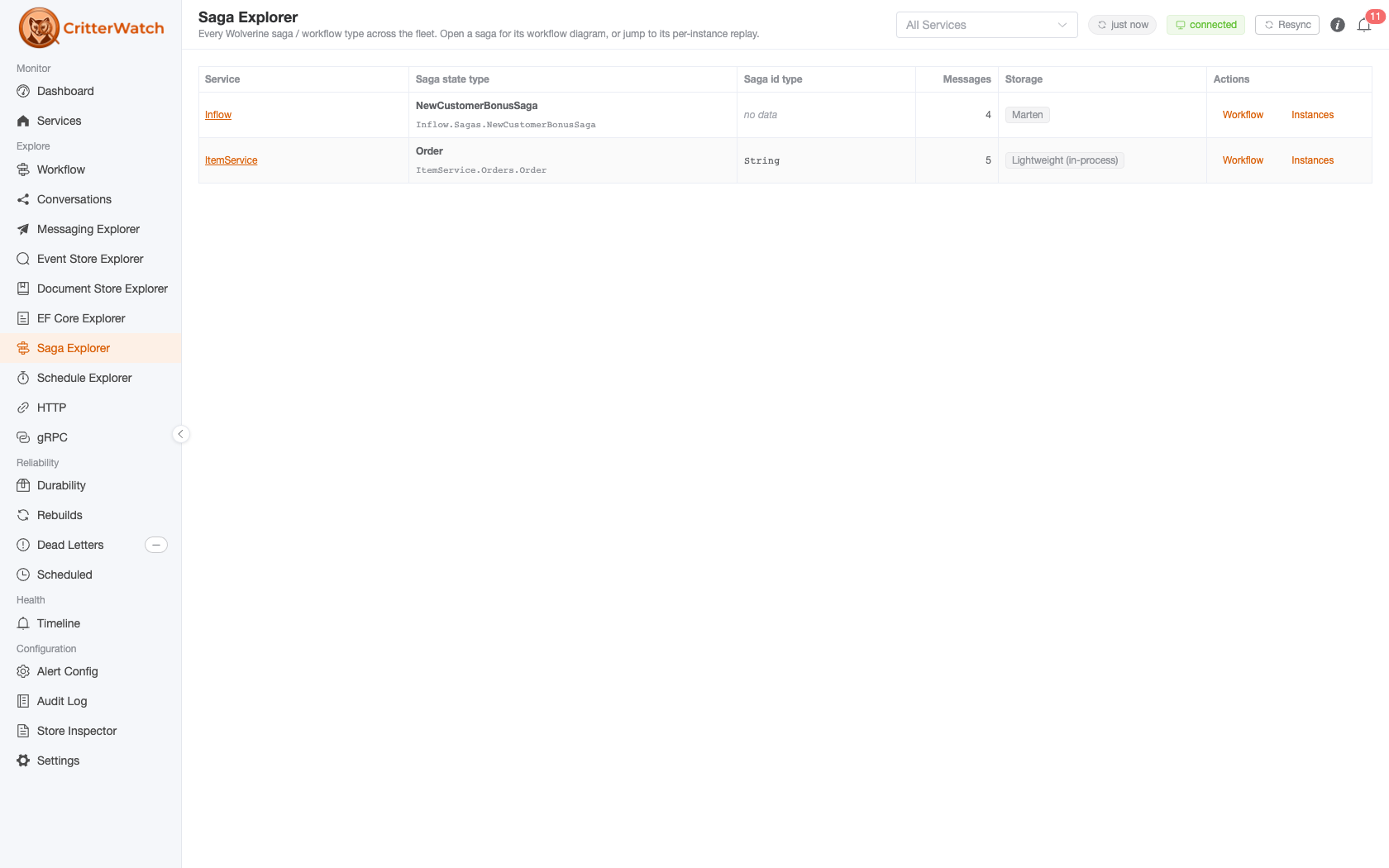
Route: /sagas. It is a peer of the EF Core Explorer and the Document Store Explorer: a flat, fleet-wide list that drills into surfaces you already have.
Scope
The explorer lists sagas across every reporting service by default. Narrowing to one service is done with the global service selector in the header — the same control every explorer reads, so a service you pick on one page stays picked as you move between them.
A ?service= deep link wins over the header selection on arrival and writes itself into the global filter, so a link you paste into chat lands your reader on the same scope you were looking at. Picking a service that hosts no saga says so ("TripService reports no sagas") and tells you to clear the header selector to see the whole fleet; it never lists the whole fleet under a header that names one service.
Only services that report at least one saga appear. If none do, the page reads "No services host a saga yet." — but note it distinguishes "no sagas" from "the fleet snapshot has not arrived yet", and shows a skeleton for the latter, so a cold load never claims your sagas are missing.
The catalog
One row per saga state type:
| Column | What it tells you |
|---|---|
| Service | The service hosting the saga. Links to that service's detail page. |
| Saga state type | The short type name, with the fully-qualified name beneath it. |
| Saga id type | The CLR type of the saga's identity (Guid, string, …), shortened to its final segment. |
| Messages | How many message types this saga handles — a rough read on how much of a workflow it carries. |
| Storage | The persistence provider backing the saga, as a tag (an em-dash when the service didn't report one). |
| Actions | The two drill-in buttons — Workflow and Instances (below). |
Rows sort by service, then by saga name.
Drilling in
Each row carries two actions:
- Workflow → the saga detail page (
/service/:serviceId/saga/:stateType), a Mermaid sequence diagram of the saga's message flow rendered from the service's reported saga capability. Static: it shows how the saga is shaped, not what any one instance did. Below the diagram is the Saga flow, which adds what instances were seen to do. - Instances → the saga's instances, read from the service's own saga storage. It needs no trace provider. The service returns a bounded peek at an arbitrary set of instances, in no particular order, so the page says how many came back and never calls the list recent or complete. Each row opens one instance.
Searching instances
On a service that advertises the saga-query client feature (Wolverine.CritterWatch 1.2 or later), the instances page carries the Document Explorer's query box: a WHERE over the saga's own members, an ORDER BY, paging, and the total number of matches. The text is run by the service's saga storage, never by the console.
- Only what the storage can do is offered. The answer reports, per saga type, whether the storage can filter, order and page, and the box disables what it cannot honour and says why. Lightweight database storages page in identity order only.
- A refused query is never an unfiltered page. A criterion the storage cannot honour is shown under the box, with the column where parsing stopped; the table is not replaced by the bounded peek.
- An older service is not sent a filter. It would ignore the filter and answer the unfiltered question, so the page shows the bounded peek and says why.
- Stuck sagas… fills the box with the stuck-saga question: not changed for N days. A saga that completes is deleted, so every stored instance is open and the preset needs no "not completed" clause. The last-changed member is your saga's own, so you name it (default
LastModified).
One instance
An instance's page opens with the Saga flow with that instance overlaid, then shows, side by side:
- Current state, as JSON, read from the service when you opened the page. ⚠️ State is current and messages are history: nothing stores a saga's state at each step, so no row in the timeline owns the state beside it. The page says how old the read is, and Refresh this re-reads everything in place.
- Messages and spans on one timeline: the messages the console captured for this saga id (conversation hops), plus the spans from the service's trace provider when one is bound, including scheduled re-entrances.
- Pending timeouts, the instance's scheduled messages, on a service running
Wolverine.CritterWatch1.2 or later. - Not yet seen, the message types the saga handles that have not been observed for this instance. Not observed is not "did not happen": the console keeps a bounded number of hops.
Each case where there is nothing to show says why, and no two read alike: the explorer switched off on the service (EnableEventStoreExplorer), no such instance (a completed saga is deleted, so it looks the same as one that never existed), the service did not answer (which says nothing about whether it has instances), no trace provider bound, and a service too old to answer for timeouts.
Reading a saga's state needs the sagas.read permission when permissions are wired, and every read is written to the audit log.
Saga flow
The saga page draws a Saga flow: what the saga declares beside what its instances were seen to do. It is a derived view, and the page says so. A Wolverine saga declares the messages it handles and publishes, so each box is a message.
| Half | Comes from | How it reads |
|---|---|---|
| Declared | The saga's descriptor: which message starts it, each message's role, what each handler can publish. | Dashed arrow, marked ►. A box nothing has shown is dashed too. |
| Observed | Conversation hops that carry a saga id, grouped by that id. | Solid arrow marked ◆, with how many instances took it. |
| Both | An arrow the saga declares and an instance took. | Solid arrow marked ✓. |
Each box counts the instances that handled the message and how many were last seen there. Last seen is not "ended": a hop does not say a saga completed, so it is either where an instance finished or where it is waiting. A timeout is labelled as one, and a timeout that was scheduled but has not fired reads sent, not handled.
An instance is grouped by saga id, never by correlation id. One instance can span several conversations: a saga started by one request and finished by another is two conversations, joined only by its id. That is why the flow lives here and not on Conversations, which keys on one correlation id and links to this page from a span's pop-up.
An arrow means one of two things. When an instance was seen sending a message, the arrow runs from the step that sent it. Otherwise it runs from the step before, is marked continues-saga, and says order, not cause.
How much it is based on
The card always says based on N instances, because hops are bounded by retention and a rarely taken branch may be missing. Read the graph as what has been seen lately, not as every path the saga can take.
- With no observed hops, the declared graph still draws, and the card says that is all it is.
- The read takes the newest 5,000 of the service's hops that carry a saga id, and counts the 200 most recently active instances. The card says when either limit cut the read, and how old the oldest hop it read is.
- Only the service hosting the saga is read: a cascaded message handled by another service is not drawn as handled.
- A saga the service does not report draws only what was seen, and says so.
The flow reads the console's own records and asks the service nothing, so a service that is down still has one. It needs the sagas.read permission when permissions are wired, and it is not audited, because it reads no saga state.
One instance on the flow
On an instance's page the same graph shows where that instance has been: the boxes it touched and the arrows it took stay lit, and the rest falls back. The box it last handled is outlined and the card says when, with any pending timeouts. An instance older than the flow's window is still shown. One that no retained hop carries says so, rather than being given a position.
Sagas also appear elsewhere
A DbContext that stores sagas lists them as chips on its card in the EF Core Explorer, and per-service saga information stays available on the service detail page. The Saga Explorer is the fleet-wide entry point, not the only one.
For agents
The same questions are open to an AI agent over MCP: list_sagas is this catalog, list_saga_instances reads a saga's recent instances from the service's own storage, and get_saga_instance returns one instance's state, the messages it has executed and the ones still outstanding, in one call. They need mcp.sagas.read.
Searching instances
list_saga_instances is a bounded peek by default. Pass where, orderBy, arguments or page and it becomes a query run by the service's own saga storage (Wolverine 6.60): a filter and ordering over the saga's own members as Dynamic LINQ text, a page, and the total count. "Which OrderSagas are AwaitingPayment and have not changed since Tuesday?" is where: "Status = @0 and UpdatedAt < @1".
What a query can do depends on the storage, and the answer's abilities says so for that saga type:
| Storage | Filter and order on saga members | Page and count |
|---|---|---|
| Marten, EF Core, RavenDB | Yes | Yes |
| Lightweight database storages (PostgreSQL, SQL Server, MySQL, Oracle, SQLite, and Polecat / Fisher) | No: refused | Yes, in identity order |
A criterion a storage cannot honour is refused (CriteriaRefused), never answered with an unfiltered page. The console sends a query only to a service that advertises the saga-query client feature, so a service on an older Wolverine.CritterWatch is told so instead of being asked a question it would answer wrongly.